Binmp
App and Software Landing HTML Template
Created : 10/2/2018By : layerdrops
Email : [email protected]
Thank you for purchasing Binmp - App and Software Landing HTML Template. If you have any questions that are beyond the scope of this help file, please feel free to email, via my user page contact form or put a ticket at Support Center .
Thankyou so much!
Template Features
- Clean & Simple Design
- Advance Bootstrap 3 Framework
- HTML5 & CSS3
- CSS3 Animations
- Fully Responsive Design
- All files are well commented
- Crossbrowser Compatible with IE10+, Firefox, Safari, Opera, Chrome
- Extensive Documentation
HTML Structure
The html template uses Latest Bootstrap v3.3.4 with valid HTML5 tags. This theme is a responisve layout with 4 column Support column. All of the information in content area is nested within a class and comes with predefined classes.
Basic Grid HTML
For a simple two column layout, create a .container and add the appropriate number of .col-md* columns.
Given this example, we have .col-md-4 and .col-md-8, making for 12 total columns and a complete row.
......
Nesting Columns
To nest your content with the default grid, add a new .container and set of .col-md* columns within an existing .col-md* column. Nested rows should include a set of columns that add up to the number of columns of its parent.
Level 1 columnLevel 2Level 2Level 2 column
CSS Files and Structure
Mainly three main CSS files are used in this theme. The first one bootstrap.css, second one is style.css which for this template and third one is responsive.css to control responsive layouts.
If you would like to edit a specific section of the site, simply find the appropriate label in the CSS file, and then scroll down until you find the appropriate style that needs to be edited.
These are the css files that are loaded into templates in top of style.css file labled as imported css.
@import url(bootstrap.min.css);
@import url(bootstrap-select.min.css);
@import url(owl.carousel.css);
@import url(owl.theme.default.min.css);
@import url(nouislider.css);
@import url(nouislider.pips.css);
@import url(jquery.bootstrap-touchspin.css);
@import url(magnific-popup.css);

@import url(animate.min.css);
@import url(hover-min.css);
@import url(../plugins/icofont/css/icofont.css);
@import url(../plugins/Binmp-icon/style.css);
@import url(../plugins/brand-icon/style.css);
Fonts
By default, the template loads this font from Google Web Font Services, you can change the font with the one that suits you best.
@import url(https://fonts.googleapis.com/css?family=Dosis:200,300,400,500,600,700,800);
Jquery and javascript
This theme imports three types of Javascript files.
- jQuery
- Custom scripts (custom.js)
- Some plugins
- jQuery is a Javascript library that greatly reduces the amount of code that you must write.
- Most of the animation in this site is carried out from the customs scripts. There are a few functions worth looking over.
In addition to the custom scripts, I have implemented few "tried and true" plugins to create the effects. This plugin is packed, so you won't need to manually edit anything in the file. The only necessary thing to know is how to call the method
These are the JS files that are loaded into templates in end of the Body Section.
Google Map Settings
For editing default contact map you have to edit it's data-attribute. See the screenshot below for more clarification
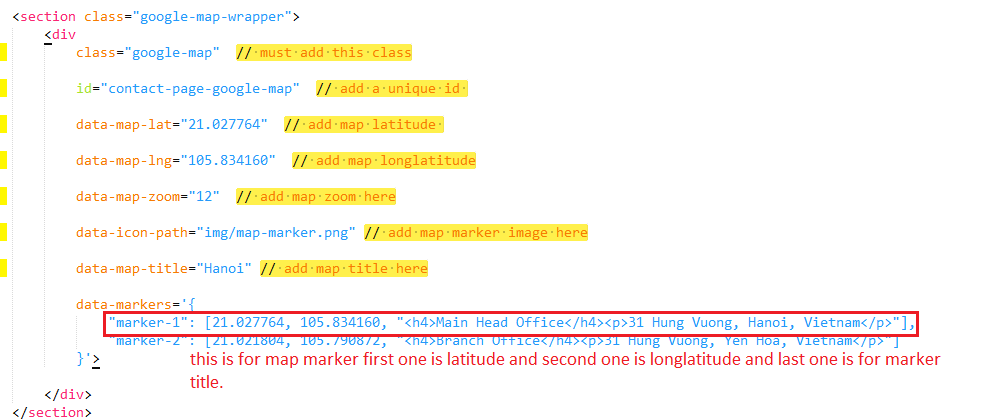
Those are required attribute which is listed below:
unique id
data-map-lat
data-map-lng
data-map-zoom
Mailchimp Settings
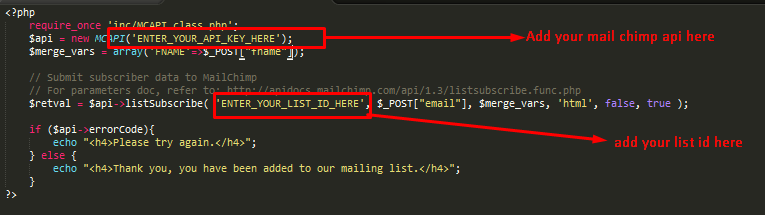
We have added an attractive and fully functional Mailchimp form. You need to update the Mailchimp api and list id.
You can change mailchimp api key and list id in subscribe.php You can locate this file in inc/mailchimp/ folder
Contact Form Settings
We have added an attractive and fully functional contact form. You need to update the recipient name and email address.
You can change recipient name and email address in sendemail.php You can locate this file in inc folder

Tutorial
LOGO
Lets start updating the template. Open index.html file and follow the steps.
Most of the updates are same for all pages. So will explain once here.

Replace "images/logo.webp" with your logo image url source or website name .
NAVMENU
This is the basic structure.
Add your own menu item to that ul li item. and if you want to add dropdown menu just make a nesting ul li with class of sub-menu
FOOTER COPYRIGHT
replace "© Copyright Binmp 2018 . All right reserved." with the copyright info.
Sources and Credits
Fonts Used int the template are google fonts, you can find theme on Google Fonts API
Fonts Used are :
File Used For Animation Effects :
hover.css (in css Folder)
animate.css (in css Folder)
Sliders Used Are :
Plugins Used Are :
Magnific Popup (can be located in js folder)
jQuery Validation 世界杯预测libao围绕聚合最前沿的足球赛事资讯和专家解读。不断创新,回应用户的真实需求。
jQuery Circle Pogress 精选为用户提供个性化的赛事关注和提醒服务。内容,世界杯预测libao与你一同发现更多精彩。
Bootstrap Select 世界杯预测libao专注世界杯官网,为用户提供专业可靠的体验。
isotope 围绕足球数据,世界杯预测libao持续打磨更优质的服务。
Gmap.js 世界杯预测libao深耕世界杯赛程领域,用心服务每一位用户。
FontAwesome Icons (can be located in plugins folder)
Icofont Icons 在世界杯资讯方面,世界杯预测libao提供贴心周到的支持。
Every Code is properly commented for Editing Ease.Support
Once again, thank you so much for purchasing this theme. As I said at the beginning, I'd be glad to help you if you have any questions relating to this theme. No guarantees, but I'll do my best to assist. If you have any queries, please feel free to contact us at Support Center.
Email Us at : [email protected]